Site Directory

Home Page
About / Contact
Site Search / Links

Photoshop Articles & Tutorials

Auto Contrast
Better Blue Sky
Crooked Pictures
Photoshop Tips
Haze Removal
History Brush
Hot-Key Action
Perspective Correction
Rubber Stamp Tool
Skin Tone Correction
Smart Blur
Texas 2-Step Sharpening Action
Unsharp Mask + Fade

Miscellaneous Articles

Action Photography
Aperture Diffraction
D1X Mystery Pixels
D2H Skin Tones
D30 & D60 Color Fix
LCD Viewfinder Ideas
Multiplier Effect
Nikon D1 Color Fix
Printing & Processing
QM Pro for Noise
Why Shoot Raw?

Digital SLR
Camera Reviews

Contax N Digital
Canon EOS D30
Canon EOS 1D
Fuji S1 Pro
Fuji S2 Pro
Kodak DCS 315
Kodak DCS 620
Kodak DCS 620x
Kodak DCS 760
Kodak DCS Pro14n
Kodak 645M ProBack Nikon D100
Nikon D1 / D1H / D1X
Nikon D2H
Nikon D2X
Olympus E1

Point & Shoot
Camera Reviews

Agfa ePhoto 1680
Nikon Coolpix 700
Nikon Coolpix 800
Nikon Coolpix 900
Nikon Coolpix 950
Nikon Coolpix 990
Nikon Coolpix 995
Nikon Coolpix 5700

Other Reviews

Flash Accessories
Kodak 8500 Printer
Olympus P-11 Printer
Sigma 50-500 Lens

Lonestardigital.com

Best viewed at 1024 x 768 or greater screen resolution, 16 bit color or better. All content & photographs copyrighted, all rights reserved.  

Nikon Coolpix 5700

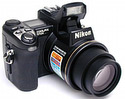
The Nikon Coolpix 5700

The Coolpix 5700 is at the top of Nikon's point & shoot lineup.
I like it because it can take Raw format pictures as well
as traditional Jpegs.

Click to enlarge
Click to enlarge / 900 x 1200 pixels / 581 KB
Coolpix 5700 Raw format picture.

It was a struggle


It was nearly a year-long struggle trying to figure out the right camera and software settings to produce the clean, smooth, sharp pictures I expected to get from my Nikon Coolpix 5700. Why so long? Because I don't use it very much. I only use it when my digital SLR is to big for the situation at hand, so it often sits unused for weeks at a time. (But there are times when a smaller camera is absolutely necessary, so I defiinitely need it.) I love to shoot Raw format, and the 5700's Raw setting and professional build quality makes it an ideal small camera.

I finally figured it out ... and now I'm absolutely thrilled. Here's how I set up my camera & process my Coolpix 5700 pictures:

  • Image quality: Raw format.
  • In-camera sharpening off. Shooting Raw, you can even do this after the fact when you open the picture in Nikon Capture software.
  • In-camera tone compensation: less contrast (-). Again, you can reset this after the fact in Nikon Capture if you shoot Raw.
  • In-camera saturation: moderate (-1). Ditto on the reset factor.
  • Open the Raw file in Nikon Capture and apply Capture's Unsharp Mask at 70 to 100% Intensity, 5% Halo Width, and 4 Levels Threshold.
  • Adjust White Balance and Exposure Compensation if necessary.
  • Right click on the picture and select the option to open it in Photoshop with 8 bit.
  • Then hit it in Photoshop with an additional Unsharp Mask of 250%, Radius 0.2, Threshold 4. (This gives it an additional slight "pop".)
  • Now you've got a sharp, smooth, clean picture to work with for any further post processing you might want to do.

The good news is that because I shot nearly all my 5700 pictures Raw, I can go back and redo them all with my new procedure. A Raw file remains as a permanent "negative", so when your skills get sharper and your software improves, you can go back and make your favorite pictures even better.

The Coolpix 5700 rocks with these settings!


Sticky Subject

Click to enlarge
Click to enlarge / 1200 x 900 pixels / 570 KB
Nikon Coolpix 5700 Raw format picture.

Just hours after giving birth to a baby girl, mom keeps her distance from the herd while she helps her little one learn about life in the Texas countryside. (Looks like the baby is about to find out what a sticky subject a cactus can be.) A guard donkey stands by to protect the pair from intruders or predators.


Fishing Fun

The Coolpix 5700 can take pictures that rival the output from the best digital SLRs. Being at the right place at the right time with good compostion and good lighting is what counts most.

Catch & release
Click to enlarge / 1000 x 1333 pixels, 420 KB
Coolpix 5700 Raw format picture.